 Code of Conduct
 Ethical Mgmt
 Speak-up Culture
 Latin America
 Asia Pacific
 FX Global Code
 Financial Services
 North America
 Europe
 Middle East
 MSBs
MSBs FinTech
 Insurance
 Investing
 Casinos
 Retail Banks
 Manufacturing
 U.S. National
 Canada
 California
 New York
 Illinois
 Connecticut
 Maine
Maine Delaware
 Retail
 Warehouse
 Healthcare
 Animated
 Billing & Revenue
 IT & Admins
 Leadership
 Ontario
 British Columbia
 UK Induction
 Australia & NZ
 Workplace Violence Prevention
 Canada
 Italy
Italy Active Shooter
 AI & Workplace
 Corporate Ethics
 Whistleblower
 Gvmt Contracting
 Export Controls
In theory, your case management system should give your team a strong foundation to conduct effective investigations. But many compliance teams spend more time managing the case management itself: retyping reports, chasing context across inboxes, and rebuilding the board report by hand. It's important work, but with the prevalence of reliable AI applications you have to ask: is this a good use of my time?
With only 22% of compliance teams achieving broad AI adoption (source), there's a lot of room to hand off the busywork and focus on what really matters. Adoption is low, but the tools are ready. Here's where things break down, where AI fits, and three prompts you can use today.
Where case management breaks down
Reports slip through the cracks. When employees raise a concern, 59% go directly to a manager while only 11% use an ethics hotline (source). A concern raised in the breakroom lands in an inbox or a Teams thread. When employee relations (ER) and compliance run separate intake, some cases get logged twice while others are missed entirely.
Busywork eats the investigation. Someone retypes every off-hotline report by hand. It's tedious, and every retyped field results in a higher chance of error. Context lives in folders and side spreadsheets, and categories drift from one investigator to the next.
Your history is stuck. Years of cases sit in the legacy system, so switching vendors feels risky. Lose that history, and you lose the record of how every case was handled.
Board prep is manual. Every quarter means time spent on exports to Excel and compiling spreadsheets. By the time the report's done, the data's already out of date.
How AI can help
Each of those problems has the same root: tedious work eating your team's afternoons. That's exactly the work AI is good at. Here's how we see compliance professionals making it happen, with suggested prompts you can use with your team's approved AI tools today.
A note on data: case reports are confidential. Use the AI tool your organization has sanctioned for sensitive material, not a personal account, strip names and identifiers where you can, and check your own policy before pasting anything in.
Turn reports from any source into a case. Give AI an email, a spreadsheet, or a screenshot of a Slack DM, and it'll turn it into a structured, audit-ready case. No retyping, and every report lands in your system of record, structured.
Here are the fields in our case record template: [paste field names, e.g., date received, intake channel, reporter, subject(s), business unit, allegation category, summary, open questions]. Below is a concern exactly as it was received (an email, a chat message, or notes from a conversation). Fill in each field using only what's in the report. Where something isn't stated, write "not provided" instead of guessing. Keep the summary to two sentences.[paste report]
Brief anyone in two minutes. AI can write a summary of each case and update it as interviews, notes, and evidence come in. You'll have the full timeline at hand, ready to hand off a case or brief outside counsel without drafting a memo from scratch.
You're briefing a colleague who has never seen this case. From the notes below, write a three-sentence overview of the allegation, a dated timeline of every action taken so far, the current status, and a list of open items with an owner for each. Stay under 250 words and don't draw conclusions that aren't in the notes.[paste case notes]
Ask your program a question. Ask a plain-English question and get a report back: "Which business unit had the most retaliation reports this year?"
Attached is an anonymized export of our closed cases (date, business unit, category, outcome, days to close). Which business unit had the most retaliation reports this year, and how does that compare to last year? Show the numbers behind your answer in a small table and flag it if the sample is too small to mean anything.
Everything above works with the AI your company already has, and that's a good place to start. The limit is that the results live outside your system of record. Every summary has to be pasted somewhere, every category re-keyed, every import rebuilt by hand. Purpose-built AI for compliance does the same work inside the case file, with your fields, your categories, and your audit trail already attached. Here's what that looks like in Ethena.
AI built for compliance teams
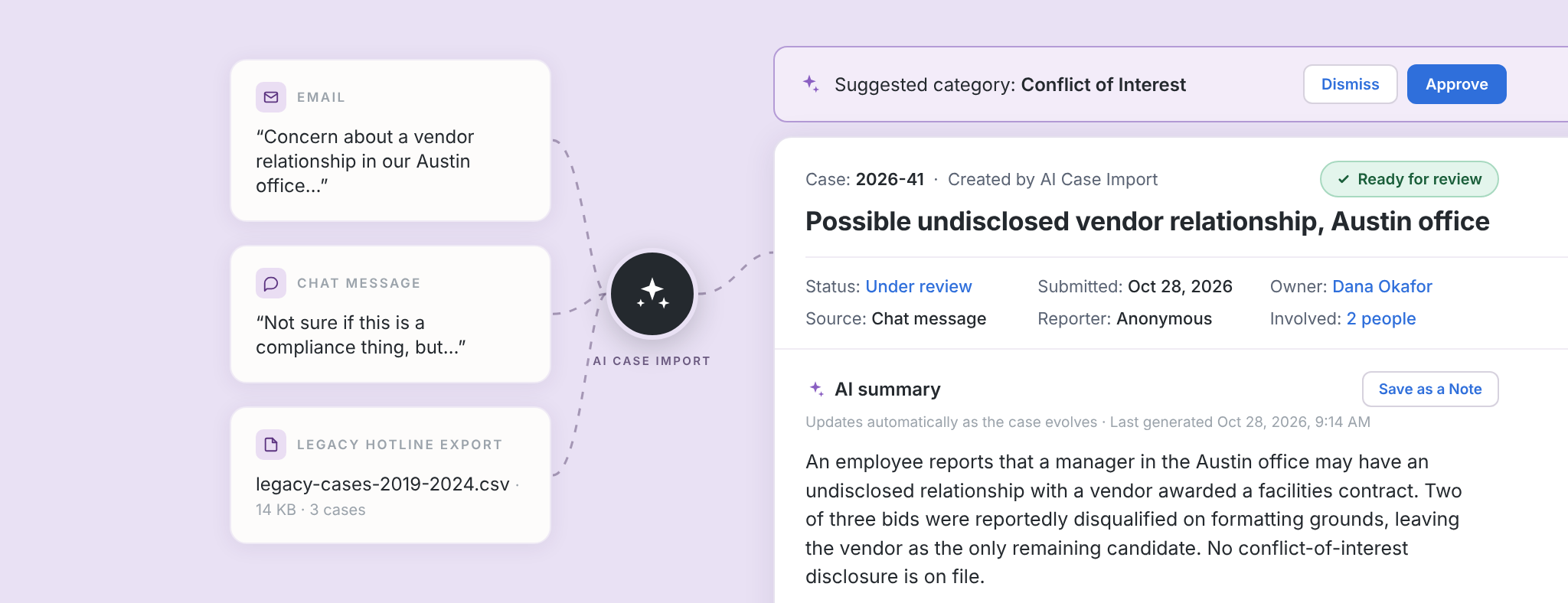
Ethena's case management supports compliance teams with AI-assisted workflows. The latest addition, AI case import, cuts the retyping at intake and keeps every case structured. Your team spends its time making the calls.
Log the reports that skip the hotline. A shift lead on the warehouse floor emails HR about a concern, or a manager flags something in Slack. Send it to your case management system in one click, without logging each detail by hand.
Find any case in seconds. Imported and new cases live in one place as structured, searchable records. Every case will appear with a quick AI summary.
Keep ER and compliance in sync. If employee relations and compliance run separate intake, transfer cases between the two tools on an ongoing basis. One complete picture without the double entry.
And if you genuinely love data entry, manual entry is still there. We won't judge. See how it works.
Your team makes every call
Should AI make decisions about your cases? We'd argue: no. It should draft, summarize, suggest, and import. Your team decides who investigates, what's substantiated, and how a case closes.
That's by design. With Ethena, every AI summary and imported case is there for your review, and a full audit trail records who did what on every case. When your GC, an auditor, or a regulator asks how a case was handled, the answer is on the record.
Ready to switch? Your history comes with you.
It's one thing to see the vision here, but when it comes time to consider actually upgrading your case management system, you may start asking some big questions: what am I going to do with my current case history? Can I even migrate it at all?
The short answer: we'll help you bring it over. With AI case import, you can easily migrate cases from your old system, so your trend line doesn't restart at zero when you switch systems. Looking for a more hands-on approach? Our team handles the migration with you. And if you're still under contract with your current vendor, you don't have to wait out the term. Ethena will buy out your current contract and import your existing cases. Your history comes with you, and you can get started today. Terms and conditions apply.
Want to see AI case management on your own cases? Let's talk.